

For small to mid-sized businesses, technical SEO isn’t about chasing every Google update or achieving perfect scores across the board. It’s about making smart, impactful choices that directly improve your visibility and user experience without draining limited resources. This guide cuts through the noise, focusing on what truly moves the needle for teams operating under real-world constraints.
You’ll gain a clear framework for prioritizing technical SEO tasks, understanding which efforts deliver the highest return on investment, and critically, what to deprioritize or skip entirely to maintain focus on growth.
Prioritizing Core Web Vitals and Page Experience
Google has made it clear: user experience is a ranking factor. Core Web Vitals (CWV) are a direct measure of this, and they matter. For SMBs, this isn’t about achieving a perfect 100 score; it’s about ensuring your site provides a reasonably fast and stable experience. Focus on the big three:
- Largest Contentful Paint (LCP): How quickly the main content of your page loads. This is often tied to image optimization, server response time, and render-blocking resources.
- Interaction to Next Paint (INP): (Replacing FID in March 2024) Measures the responsiveness of a page to user interactions. This often involves optimizing JavaScript execution and reducing main thread work.
- Cumulative Layout Shift (CLS): How much unexpected layout shift occurs during page load. This is usually caused by images without dimensions, dynamically injected content, or web fonts.
What to do: Use Google Search Console’s Core Web Vitals report to identify problematic pages. Then, leverage PageSpeed Insights to diagnose specific issues. Start with low-hanging fruit: optimize image sizes, implement lazy loading, and ensure your hosting is adequate. Address major CLS issues first, as they are often the most frustrating for users.
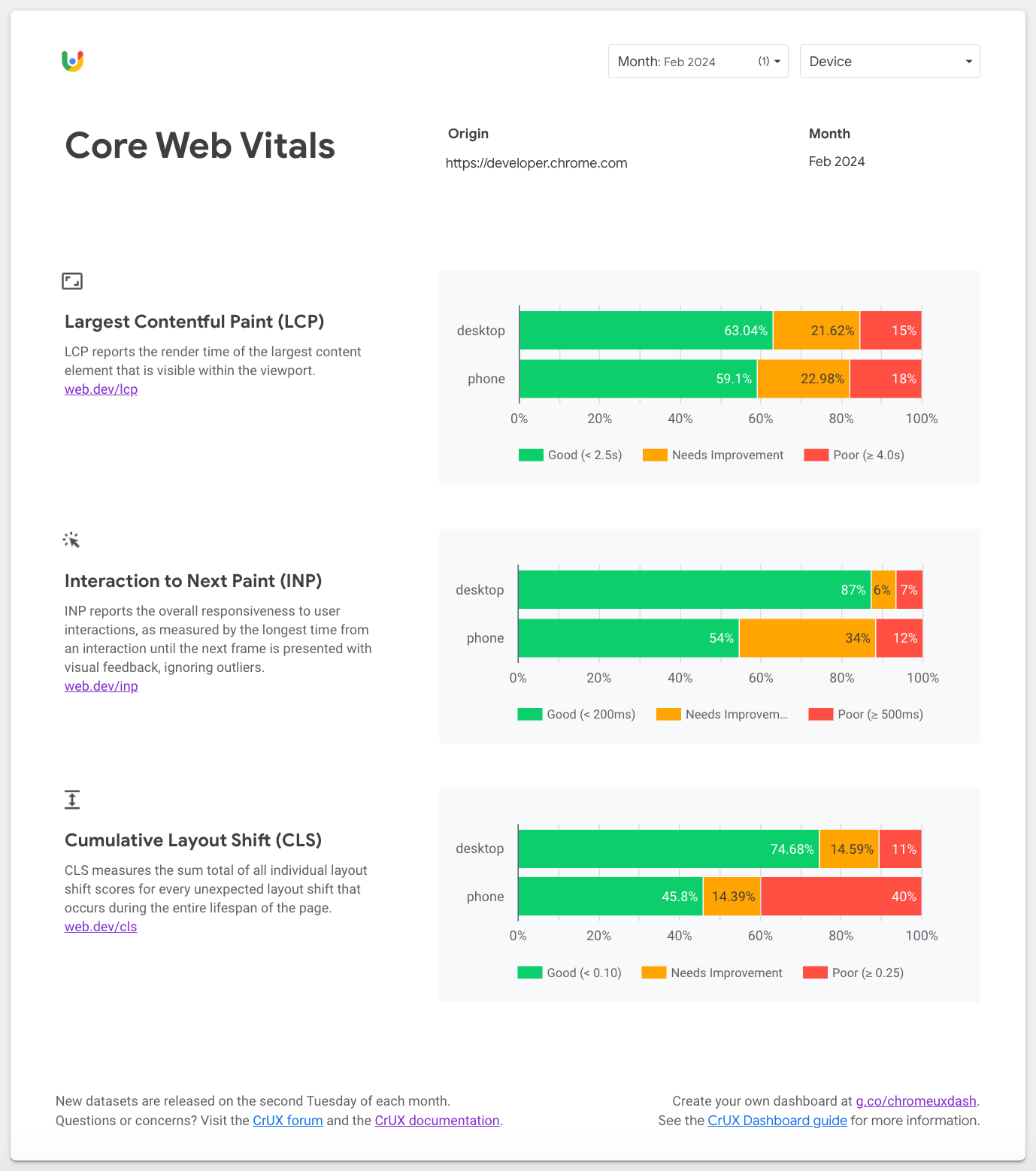
What to delay/avoid: Don’t get bogged down in micro-optimizations for a few milliseconds if your LCP is already under 2.5 seconds and INP is below 200ms. Focus on fixing widespread issues impacting many pages rather than chasing perfection on a single, low-traffic page. Avoid over-engineering solutions when simpler fixes exist.
Crawlability and Indexability: The Foundation
If search engines can’t find or understand your content, it won’t rank. This is non-negotiable. Ensuring your site is easily crawlable and indexable is the absolute bedrock of technical SEO.
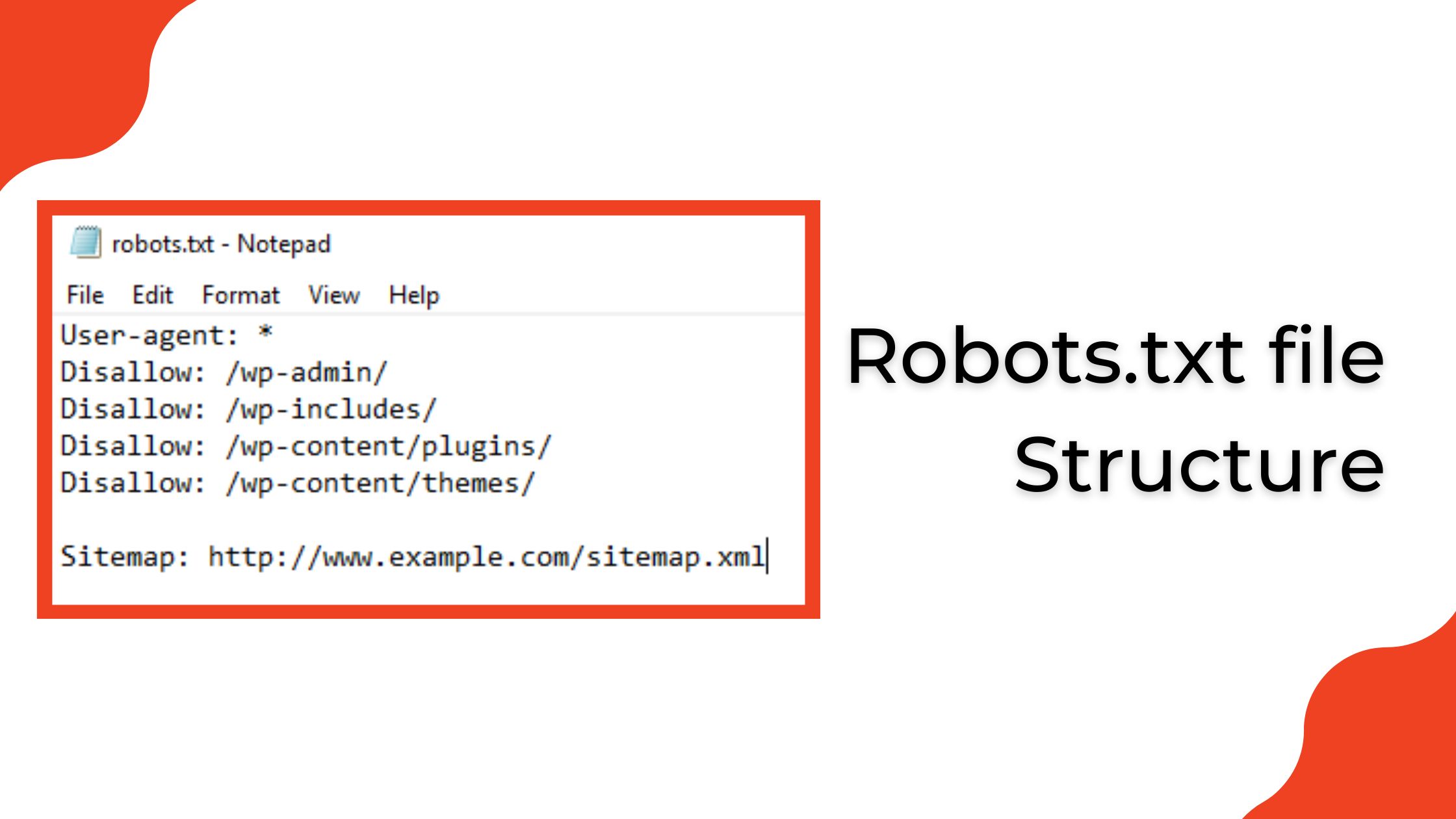
- Robots.txt: Directs search engine bots on what parts of your site they can and cannot access. Ensure you’re not accidentally blocking important content.
- XML Sitemaps: Provide a roadmap of all important pages on your site, helping search engines discover them efficiently. Submit these to Google Search Console.
- Canonical Tags: Prevent duplicate content issues by telling search engines which version of a page is the authoritative one, especially for e-commerce sites with product variations or filtered results.
- Internal Linking: A strong internal link structure helps distribute link equity, guides crawlers, and improves user navigation.
What to do: Regularly check your Google Search Console’s ‘Indexing’ reports for errors. Ensure your robots.txt isn’t blocking critical pages. Verify your sitemaps are up-to-date and submitted. For e-commerce, pay close attention to canonicalization on product and category pages to avoid duplicate content penalties. Google Search Console indexing report guide
What to delay/avoid: Don’t spend excessive time on log file analysis for minor crawl budget optimizations unless you have a massive site (tens of thousands of pages) and are experiencing clear, widespread indexing issues. For most SMBs, ensuring basic crawlability and indexability is sufficient.
What often gets overlooked is that crawlability and indexability aren’t a “set it and forget it” task. Websites are dynamic. A seemingly minor site redesign, a platform migration, or even a new content management system update can silently introduce issues. A misconfigured `robots.txt` file or an outdated sitemap can go unnoticed for months, slowly eroding your organic visibility without immediate, obvious errors. The consequence isn’t a sudden penalty, but a gradual decline in indexed pages and potential traffic, making diagnosis harder as the problem compounds over time.
Another common pitfall lies in the interaction between different technical directives. It’s easy to create conflicting signals for search engines. For instance, a page might be included in your XML sitemap, suggesting it’s important, but simultaneously have a `noindex` tag in its HTML header, telling crawlers not to index it. Or, a `robots.txt` disallow might prevent crawlers from even reaching a page to discover its canonical tag, leading to unintended duplicate content issues. These subtle conflicts create confusion for bots and can result in important content being de-indexed or the wrong version of a page ranking.
For small to mid-sized teams, the pressure to “do SEO” can lead to chasing advanced optimizations before the fundamentals are solid. While it’s wise to deprioritize granular crawl budget analysis for most, neglecting the basic health checks for crawlability and indexability has a direct, measurable impact. Every important page that isn’t indexed is a lost opportunity for organic traffic. The frustration often stems from investing effort into content creation or link building, only to find those efforts yield minimal returns because the underlying technical foundation is silently broken, preventing search engines from even seeing the work.
Schema Markup: Enhancing Visibility
Schema markup helps search engines understand the context of your content, leading to rich snippets and improved click-through rates (CTR) in search results. It’s not a direct ranking factor, but it significantly enhances your visibility.
- Organization Schema: Essential for any business, providing details like name, address, phone number, and logo.
- Product Schema: Crucial for e-commerce, displaying price, availability, and reviews directly in search results.
- Article Schema: Beneficial for blogs and news sites, showing publication date, author, and image.
- LocalBusiness Schema: Important for brick-and-mortar businesses to appear in local search packs.
What to do: Start with the most relevant schema types for your business model. For an e-commerce site, product schema is paramount. For a service business, LocalBusiness and Organization schema are key. Use Google’s Rich Results Test tool to validate your implementation. Schema markup guide for small businesses

What to delay/avoid: Don’t try to implement every single schema type available. Focus on those that directly support your core business offerings and are likely to generate rich snippets. Avoid complex, custom schema implementations without clear evidence of benefit or proper testing.
What’s often overlooked is the ongoing maintenance burden. Implementing schema isn’t a ‘set it and forget it’ task. As your website content evolves—product descriptions change, articles are updated, or business hours shift—your structured data needs to reflect those changes. This ‘schema drift’ is a common failure mode, leading to outdated or inaccurate information being fed to search engines. The consequence isn’t just a missed opportunity for rich snippets; it can also result in warnings in Google Search Console, signaling a lack of data integrity that can subtly impact trust and visibility over time.
Another non-obvious challenge is the gap between technically valid schema and schema that actually generates rich snippets. Google’s Rich Results Test might confirm your markup is syntactically correct, but that’s only half the battle. Search engines still make a judgment call based on content quality, relevance, and overall site authority. Teams often face frustration when they’ve meticulously implemented schema, only to see competitors with seemingly less effort gain rich snippets. This discrepancy can lead to wasted cycles chasing a technical fix when the underlying issue might be content quality or broader site trust, creating internal pressure and misdirected effort.
The temptation to quickly deploy schema using automated plugins or generic tools is strong, especially for resource-constrained teams. While these can provide a baseline, they often fall short of capturing the nuanced, specific data that truly differentiates your content. The hidden cost here is a form of technical debt: generic schema might not hurt, but it won’t provide the competitive edge either. Worse, poorly configured automated tools can sometimes generate conflicting or redundant markup, creating a cleanup task later that’s far more complex than a thoughtful manual implementation would have been initially. This downstream effect can tie up development resources that could be better spent elsewhere.
Mobile-First Indexing and Responsiveness
Google primarily uses the mobile version of your content for indexing and ranking. If your site isn’t mobile-friendly, you’re at a significant disadvantage.
- Responsive Design: Your website should adapt seamlessly to any screen size, from desktop to smartphone.
- Mobile Speed: Mobile users expect fast loading times. Optimize images, leverage browser caching, and minimize render-blocking resources on mobile.
- Content Parity: Ensure all important content and internal links available on your desktop site are also present and easily accessible on your mobile version.
What to do: Use Google Search Console’s ‘Mobile Usability’ report to identify issues. Test your site regularly on various mobile devices. Prioritize fixing any mobile usability errors reported by Google. Ensure your mobile site loads quickly and provides a good user experience.

What to delay/avoid: Unless you have a very specific, well-resourced reason, avoid creating a separate m.dot mobile site. Maintaining two distinct versions often leads to content duplication, canonicalization headaches, and increased development costs for SMBs. A single, responsive design is almost always the better choice.
Security (HTTPS): Non-Negotiable Baseline
HTTPS is a fundamental security measure and a confirmed ranking signal. If your site isn’t secure, you’re not just losing trust; you’re actively hindering your SEO performance.
- SSL Certificate: Ensure you have a valid SSL certificate installed and properly configured.
- HTTPS Everywhere: All pages and resources on your site should load over HTTPS.
- Redirects: Implement proper 301 redirects from HTTP to HTTPS to ensure search engines and users always land on the secure version.
What to do: Verify your site is fully on HTTPS. Check for mixed content warnings (where some resources load over HTTP on an HTTPS page) and fix them immediately. This is a foundational element that should be addressed without delay.
What to Deprioritize or Skip Today
For most small to mid-sized businesses, certain advanced technical SEO tactics offer diminishing returns and can be a significant drain on limited resources. Today, you should generally deprioritize deep dives into server-side rendering (SSR) or complex static site generation (SSG) for content that doesn’t absolutely demand it for performance or user experience. While these can offer benefits, the development overhead, maintenance complexity, and potential for new technical debt often outweigh the marginal SEO gains for a typical SMB website. Similarly, extensive A/B testing of minor technical elements like button colors or font sizes for SEO impact should be delayed until core technical issues are resolved and content strategy is robust. Focus your efforts on the high-impact areas outlined above; these provide the most direct and measurable improvements for your search performance and user experience, which is where your limited budget and headcount will yield the greatest returns.



Leave a Comment