


Practical Core Web Vitals for Real-World SEO
For small to mid-sized businesses, optimizing Core Web Vitals isn’t about chasing perfect scores; it’s about making strategic improvements that genuinely impact user experience and, consequently, organic search rankings. This article cuts through the noise to provide actionable steps, helping you prioritize fixes that deliver the most significant return on your limited time and budget. You’ll gain a clear understanding of what to tackle first, what to delay, and how to avoid common pitfalls that drain resources without tangible benefits.
By focusing on the most impactful changes, you can improve your site’s performance, satisfy Google’s ranking signals, and provide a smoother experience for your customers, all while operating within your team’s real-world constraints.
Why Core Web Vitals Still Matter (and Why They’re Often Ignored)
Core Web Vitals (CWV) remain a critical component of Google’s page experience signals, directly influencing organic search rankings. Beyond SEO, they represent fundamental aspects of user experience: how quickly content loads, how stable the layout is, and how responsive the site feels. For businesses, this translates to lower bounce rates, higher conversion rates, and a better brand perception.
Despite their importance, many small to mid-sized teams struggle with CWV. The reasons are often practical: limited development resources, a focus on new features over technical debt, and a perception that CWV optimization is complex or requires specialized expertise. However, ignoring them means leaving organic ranking potential on the table and frustrating potential customers.
The true cost of neglecting Core Web Vitals extends beyond immediate SEO penalties. It’s a form of compounding technical debt. Each new feature, content update, or third-party script added to an already sluggish foundation exacerbates the problem, making future optimization efforts exponentially more complex and expensive. What might seem like a minor performance hit today can quickly become a systemic issue requiring a costly, time-consuming overhaul down the line.
Furthermore, the gap between theoretical optimization and practical user experience is often overlooked. A site might achieve acceptable scores in a controlled lab environment, but real users encounter a myriad of variables – slower networks, older devices, competing browser tabs. This discrepancy means that while a team might feel they’ve done “enough,” a significant portion of their audience could still be experiencing frustrating delays or layout shifts, leading to higher bounce rates and a subtle, yet persistent, erosion of brand trust that’s difficult to quantify until it’s too late.
The decision to deprioritize CWV often stems from a practical dilemma: the immediate pressure to launch new features or campaigns versus the less tangible, long-term benefits of performance. Without a clear, immediate ROI, CWV improvements struggle to compete for limited development cycles against initiatives that promise direct revenue. This creates a cycle where performance issues are only addressed reactively, after they’ve already impacted business metrics, rather than proactively as a foundational element of the user experience.
Prioritizing Your Core Web Vitals Fixes
Given limited resources, a strategic approach to CWV is essential. Don’t try to fix everything at once. Focus on the metrics that typically have the largest impact and are often the easiest to address first.
- Largest Contentful Paint (LCP): This measures how long it takes for the largest content element on your page to become visible. It’s often the most impactful for user perception of speed.
- Cumulative Layout Shift (CLS): This quantifies unexpected layout shifts during page load. High CLS is incredibly frustrating for users and can lead to misclicks.
- Interaction to Next Paint (INP): As of March 2024, INP has replaced First Input Delay (FID) as the primary metric for responsiveness. It measures the latency of all user interactions with a page.
Decision-making: For most SMBs, your initial focus should be on LCP and CLS. These two metrics often have clear, actionable fixes that yield significant improvements. High LCP indicates a slow initial load, while high CLS points to a jarring user experience. Addressing these first will provide the biggest bang for your buck in terms of both user satisfaction and SEO impact. You should delay a deep dive into INP optimization until LCP and CLS are in a reasonable state. Chasing marginal INP gains when your LCP is poor is a misallocation of resources. Many common LCP and CLS fixes will also indirectly improve INP, making it a more efficient approach.
What’s often overlooked is the downstream impact of misprioritization. Chasing INP when LCP and CLS are still problematic isn’t just inefficient; it can actively erode team morale and stakeholder trust. Developers might spend cycles optimizing JavaScript execution for responsiveness, only to find that users are still abandoning pages because the initial load is painfully slow or the layout jumps around. This creates a perception that ‘performance work is hard and doesn’t pay off,’ making it harder to secure resources for future, more impactful optimizations.
The ‘easy fixes’ for LCP and CLS, while effective, also come with a practical caveat: they require ongoing vigilance. Implementing a caching strategy or optimizing images is a one-time task, but maintaining that performance requires discipline. New content, third-party scripts, or even routine platform updates can inadvertently reintroduce performance regressions. Teams often fix an issue, move on, and then find themselves back at square one months later, leading to a frustrating cycle of reactive optimization rather than proactive maintenance. This is where the theory of ‘fix it once’ clashes with the reality of a dynamic web environment.
Furthermore, a stable LCP and CLS foundation provides a clearer signal for subsequent INP optimization. When the page loads quickly and predictably, any remaining responsiveness issues are easier to isolate and diagnose. Without that baseline, you’re trying to debug interaction latency on a page that’s already struggling with fundamental loading and visual stability, which complicates the entire process and makes effective solutions harder to identify. It’s akin to trying to fine-tune an engine when the wheels are still wobbly.
Practical Steps for Improving Largest Contentful Paint (LCP)
LCP is often driven by a few common culprits. Tackle these first:
- Optimize Images: This is almost always the lowest-hanging fruit. Compress images, use modern formats like WebP, and ensure images are responsively sized. Lazy-load images that are not above the fold.
- Improve Server Response Time: Your hosting provider plays a huge role here. Consider upgrading your hosting plan or moving to a more performant provider. A Content Delivery Network (CDN) can also significantly reduce server response times for users geographically distant from your server.
- Eliminate Render-Blocking Resources: JavaScript and CSS files can block the browser from rendering content. Defer non-critical JavaScript and inline critical CSS. Minify and combine CSS and JS files where appropriate.

Taming Cumulative Layout Shift (CLS)
CLS is about stability. Unexpected shifts are usually caused by elements loading in after the initial render without reserved space.
- Specify Image and Video Dimensions: Always include
widthandheightattributes for images and video elements. This allows the browser to reserve the correct amount of space before the media loads. - Reserve Space for Ads and Embeds: If you use third-party ads or embedded content (e.g., YouTube videos, social media feeds), ensure you reserve space for them. Use CSS to define minimum heights or aspect ratio boxes.
- Preload Web Fonts: Web fonts can cause a Flash of Unstyled Text (FOUT) or Flash of Invisible Text (FOIT), leading to layout shifts when the custom font finally loads. Preload critical fonts using
<link rel="preload">and usefont-display: swap;.

Addressing Interaction to Next Paint (INP) – When It’s Time
INP measures the responsiveness of your page to user input. Since its full rollout in March 2024, it’s a key metric. However, it’s often more complex to optimize than LCP or CLS.
- Reduce JavaScript Execution Time: Heavy JavaScript is a primary cause of poor INP. Audit your scripts for efficiency. Break up long tasks into smaller, asynchronous chunks.
- Defer Non-Critical JavaScript: Just like with LCP, deferring scripts that aren’t essential for the initial user interaction can free up the main thread.
- Minimize Third-Party Script Impact: Third-party scripts (analytics, ads, chat widgets) can significantly impact INP. Load them asynchronously or defer them. Consider if every third-party script is truly necessary.
Tools for Diagnosis and Monitoring
You don’t need expensive tools to start. Google provides excellent free resources:
- Google Search Console: The Core Web Vitals report provides field data (real user data) for your entire site, highlighting pages that need attention. This is your primary monitoring tool. Core Web Vitals report Search Console
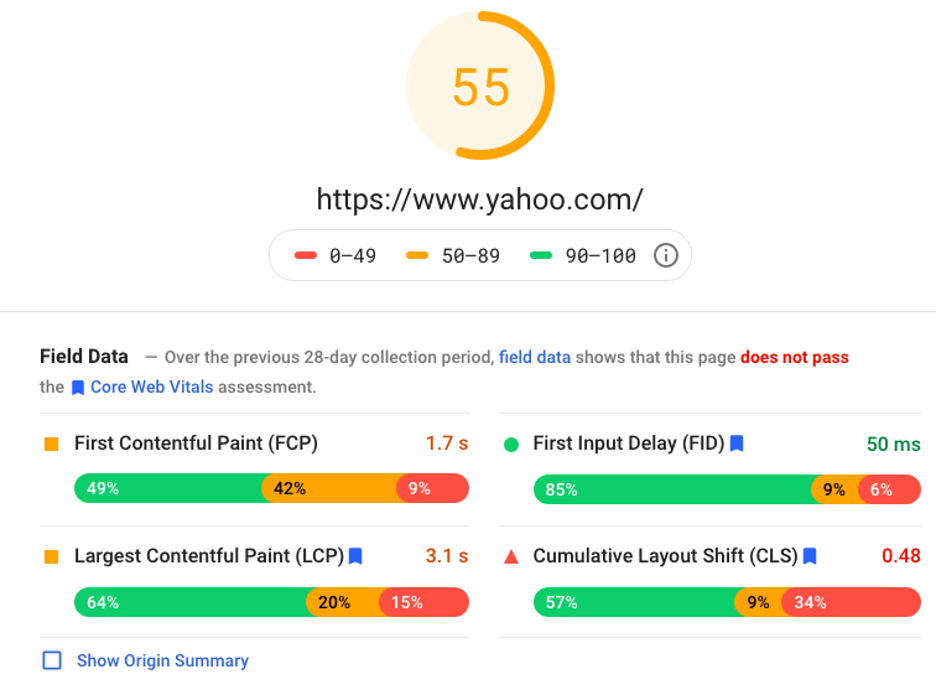
- PageSpeed Insights: Offers both field data (if available) and lab data (simulated load) for individual URLs. It provides specific recommendations for LCP, CLS, and INP.
- Lighthouse (in Chrome DevTools): Provides detailed lab data and audit reports directly in your browser, excellent for debugging specific page issues during development.
Sustaining Performance for Long-Term Gains
Optimizing Core Web Vitals isn’t a one-time task. Websites evolve, and new content, features, or third-party integrations can introduce new performance bottlenecks. Implement a routine for monitoring your CWV scores, perhaps monthly or quarterly, using Google Search Console. When adding new features or significant content, conduct a quick PageSpeed Insights check on the relevant pages. This proactive approach ensures that your hard-won performance gains aren’t eroded over time, maintaining your site’s competitive edge in organic search and providing a consistently positive user experience.


Leave a Comment