


Navigating JavaScript SEO can feel like a complex technical challenge, especially for small to mid-sized businesses with lean teams. This article cuts through the noise, offering a pragmatic roadmap to ensure your dynamic, JavaScript-driven content is fully discoverable and indexed by search engines. You’ll gain clear judgment calls on what to prioritize, what to delay, and how to make the most of your limited resources to secure your organic visibility.
We’ll focus on actionable strategies that work in the real world, helping you avoid common pitfalls and optimize your site’s performance where it matters most for SEO.
Understanding Google’s JavaScript Rendering Process
Google’s ability to crawl and render JavaScript has advanced significantly, but it’s not a magic bullet. The process typically involves two main waves: first, crawling the initial HTML, and then, if necessary, adding the page to a rendering queue. This second wave, where Googlebot renders the JavaScript to see the fully hydrated page, consumes resources and introduces delays. For SMBs, this means every page requiring extensive JavaScript rendering faces a higher hurdle for timely and complete indexing.
The critical takeaway is that while Google can render JavaScript, it doesn’t mean it renders all JavaScript perfectly, immediately, or without consuming significant crawl budget. Your goal is to make this process as efficient and reliable as possible.
Prioritizing Core Discoverability: What to Do First
When resources are tight, focus on strategies that guarantee your most important content is seen. This isn’t about doing everything, but doing the right things first.
- Server-Side Rendering (SSR) or Static Site Generation (SSG) for Critical Content: For pages that are core to your business (product pages, service descriptions, key blog posts), SSR or SSG is the gold standard. These methods deliver fully formed HTML to the browser and Googlebot on the first request, bypassing most JavaScript rendering challenges. This ensures immediate discoverability and a more reliable indexing process.
- Robust Internal Linking: Regardless of your rendering strategy, ensure all critical pages are linked from static HTML wherever possible. Googlebot relies heavily on internal links to discover new content. Complement this with a comprehensive XML sitemap that lists all indexable URLs, including those generated by JavaScript.
- Canonical Tags: Dynamic content often creates multiple URLs for essentially the same content (e.g., filtered product listings). Implement canonical tags diligently to tell Google which version is the authoritative one, preventing duplicate content issues and consolidating link equity.
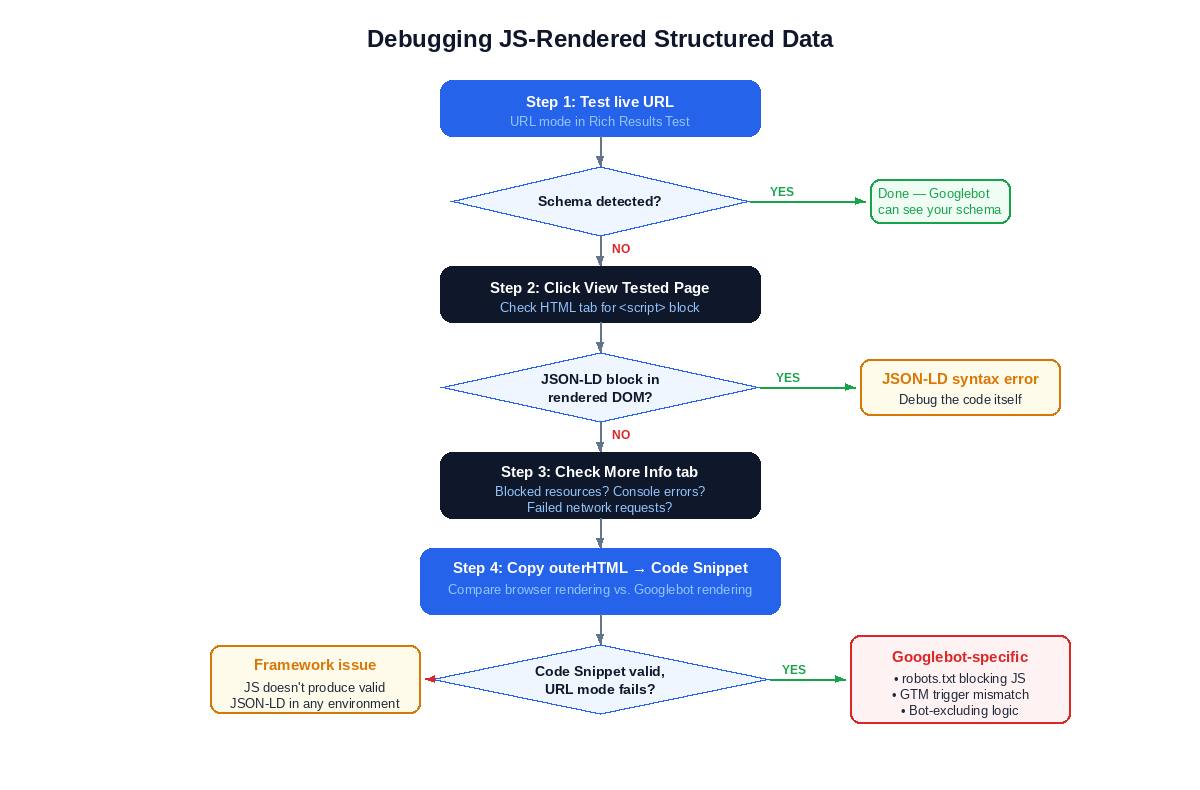
- Structured Data Implementation: Use JSON-LD to embed structured data directly into your HTML. This helps Google understand the context of your content, even if parts of it are rendered client-side. For dynamic content, ensure the structured data is present in the initial HTML or rendered reliably with the content it describes.
While SSR and SSG offer clear advantages for discoverability, their implementation isn’t a one-time task. For small teams, the ongoing maintenance and development overhead can become a significant hidden cost. Integrating these rendering strategies into existing, often complex, content management systems or custom applications requires specialized development resources and continuous attention to ensure performance and prevent regressions. What looks like a technical silver bullet on paper often translates into a sustained drain on limited engineering bandwidth in practice.
Beyond simply ensuring critical pages are linked, the quality and structure of your internal linking strategy often get overlooked. Many teams focus on adding new links but fail to regularly audit the overall site architecture for crawl efficiency and link equity distribution. A shallow or overly complex internal linking structure can inadvertently dilute the authority of important pages, making it harder for Googlebot to understand their relative importance and pass sufficient “link juice.” This isn’t just about discovery; it’s about signaling relevance and authority, a more nuanced challenge than just “linking everything.”
The theoretical simplicity of canonical tags and structured data often clashes with the reality of dynamic content at scale. In practice, managing these elements across thousands of product variations, filtered category pages, or user-generated content sections becomes a continuous, error-prone process. It’s easy to miss edge cases, introduce conflicting tags, or fail to update structured data when content changes. These inconsistencies can lead to frustrating indexing issues that are difficult to diagnose, consuming valuable team time and delaying the impact of otherwise well-optimized content. The manual oversight required often exceeds the capacity of lean teams.
What to Delay or Avoid Today
For small to mid-sized teams, not every advanced technique is worth the immediate investment. Some approaches introduce complexity that can quickly overwhelm limited resources without providing proportional SEO benefits.
- Pure Client-Side Rendering (CSR) for Core Content: While Google can render CSR pages, relying solely on it for your most important, revenue-generating content is a significant risk for SMBs. It places a heavy burden on Google’s rendering queue, can delay indexing, and is more susceptible to rendering errors or timeouts. The debugging overhead and potential for missed content often outweigh the perceived development simplicity.
- Overly Complex Dynamic Rendering Setups: Dynamic rendering, where you serve a pre-rendered version to bots and a client-side version to users, can be effective. However, implementing and maintaining it correctly requires significant technical expertise and ongoing monitoring. For most SMBs, the complexity and potential for misconfiguration make it a lower priority compared to direct SSR/SSG for critical pages.
- Excessive Use of JavaScript for Basic Navigation: If your primary navigation relies entirely on JavaScript without proper
<a>tags andhrefattributes, you’re making it harder for Googlebot to discover your site structure. Ensure fundamental navigation elements are accessible via standard HTML links.
Judgment Call: For SMBs, the biggest trap is chasing the “latest” JavaScript framework without a clear rendering strategy. Prioritize ensuring your core content is reliably discoverable via SSR or SSG. The operational overhead and debugging complexity of pure CSR or overly intricate dynamic rendering for critical pages often consume valuable development time that could be better spent on content creation or performance optimization. Focus on a solid foundation before adding layers of complexity.
For small to mid-sized teams, not every advanced technique is worth the immediate investment. Some approaches introduce complexity that can quickly overwhelm limited resources without providing proportional SEO benefits.
- Pure Client-Side Rendering (CSR) for Core Content: While Google can render CSR pages, relying solely on it for your most important, revenue-generating content is a significant risk for SMBs. It places a heavy burden on Google’s rendering queue, can delay indexing, and is more susceptible to rendering errors or timeouts. The debugging overhead and potential for missed content often outweigh the perceived development simplicity.
- Overly Complex Dynamic Rendering Setups: Dynamic rendering, where you serve a pre-rendered version to bots and a client-side version to users, can be effective. However, implementing and maintaining it correctly requires significant technical expertise and ongoing monitoring. For most SMBs, the complexity and potential for misconfiguration make it a lower priority compared to direct SSR/SSG for critical pages.
- Excessive Use of JavaScript for Basic Navigation: If your primary navigation relies entirely on JavaScript without proper
<a>tags andhrefattributes, you’re making it harder for Googlebot to discover your site structure. Ensure fundamental navigation elements are accessible via standard HTML links.
Judgment Call: For SMBs, the biggest trap is chasing the “latest” JavaScript framework without a clear rendering strategy. Prioritize ensuring your core content is reliably discoverable via SSR or SSG. The operational overhead and debugging complexity of pure CSR or overly intricate dynamic rendering for critical pages often consume valuable development time that could be better spent on content creation or performance optimization. Focus on a solid foundation before adding layers of complexity.
The initial appeal of pure client-side rendering or intricate dynamic setups often stems from a perceived development velocity. What’s easy to overlook is the downstream cost. When Googlebot struggles to render or index content, the problem often manifests as a slow, opaque decline in organic visibility, not an immediate error message. Diagnosing these issues requires specialized expertise that many SMB teams lack, leading to protracted debugging cycles, developer frustration, and a constant drain on resources that could be building new features or content. This isn’t just about a single fix; it’s about ongoing vigilance and a higher operational baseline.
Furthermore, the allure of the “latest” JavaScript framework, while offering exciting developer features, frequently comes with a hidden tax. These newer technologies often have less mature SEO tooling, fewer established best practices for search engine compatibility, and a smaller community for troubleshooting rendering-specific issues. This means your team ends up spending valuable time reinventing solutions for problems that are already solved in more stable environments, or worse, implementing workarounds that introduce technical debt. The initial development speed gain is often offset by a long tail of SEO-related maintenance and debugging, creating a cycle of reactive problem-solving rather than proactive growth.
This pursuit of “modern” often creates internal friction. Development teams, driven by innovation or personal preference, might push for a stack that simplifies their immediate coding tasks. However, this can inadvertently shift the burden onto marketing or SEO teams who then grapple with indexing inconsistencies, poor crawl budget utilization, and the constant need to explain why organic traffic isn’t performing as expected. The theoretical elegance of a complex rendering solution rarely accounts for the real-world pressure on small teams to deliver measurable results with imperfect tools and limited bandwidth.
Practical Tools and Checks for SMBs
You don’t need an enterprise budget to monitor your JavaScript SEO. Several free and affordable tools are indispensable.
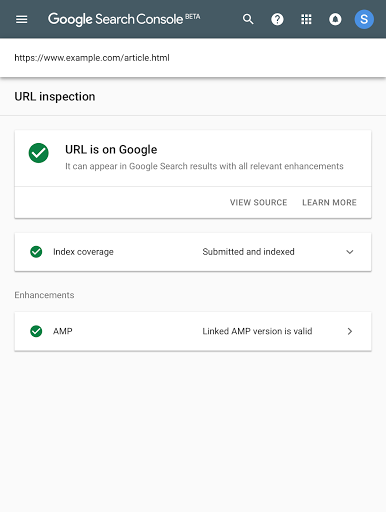
- Google Search Console (GSC): This is your primary diagnostic tool. Use the URL Inspection tool to see how Googlebot renders a specific page. Check the “View crawled page” section for the HTML Google saw initially and the “More info” tab for JavaScript console errors. Pay close attention to the “Page resources” section to ensure all critical assets (JS, CSS) are fetchable. The Core Web Vitals report within GSC also highlights performance issues that often stem from JavaScript.
- Rich Results Test: If you’re using structured data, this tool helps validate its implementation and shows how Google interprets it. Essential for ensuring your rich snippets appear correctly.
- Lighthouse (Chrome DevTools): Run Lighthouse audits directly from your browser. It provides actionable insights on performance, accessibility, and SEO, many of which are directly related to JavaScript execution and rendering.
- Screaming Frog SEO Spider: This desktop crawler can be configured to render JavaScript, allowing you to see the fully rendered DOM of your pages. It’s invaluable for identifying broken links, missing titles, or other SEO issues that only appear after JavaScript execution. JavaScript SEO crawling
Maintaining Performance and User Experience
JavaScript SEO isn’t just about discoverability; it’s also about delivering a fast, smooth user experience, which Google heavily factors into ranking. Performance issues often stem from poorly optimized JavaScript.
- Core Web Vitals Optimization: Focus on improving Largest Contentful Paint (LCP), Cumulative Layout Shift (CLS), and Interaction to Next Paint (INP). JavaScript often contributes significantly to poor scores in these metrics. Techniques like code splitting, lazy loading, and deferring non-critical JavaScript can make a substantial difference.
- Optimize Third-Party Scripts: Analytics, advertising, and other third-party scripts can severely degrade performance. Audit these regularly, load them asynchronously or defer them, and consider self-hosting where appropriate and permissible.
- Accessibility (A11y): Dynamic content must remain accessible. Ensure interactive elements are keyboard-navigable, have proper ARIA attributes, and convey their state changes to assistive technologies. A well-structured, accessible site is often a well-optimized site for search engines too.



Leave a Comment